# Docusaurus(文档站框架)
Docusaurus 是一个开源的静态网站生成器,专注于帮助开发者快速构建、部署和维护文档类网站。
> 官网:https://docusaurus.io/zh-CN/
## 下载运行
```bash
npx create-docusaurus@latest my-website classic
```
如果需要支持 `typescript`,则使用
```bash
npx create-docusaurus@latest my-website classic --typescript
```
下载依赖
```bash
pnpm i
```
运行项目
```bash
pnpm run start
```
## 项目结构
默认的项目结构如下
```text
my-website
├── blog
│ ├── 2019-05-28-hola.md
│ ├── 2019-05-29-hello-world.md
│ └── 2020-05-30-welcome.md
├── docs
│ ├── doc1.md
│ ├── doc2.md
│ ├── doc3.md
│ └── mdx.md
├── src
│ ├── css
│ │ └── custom.css
│ └── pages
│ ├── styles.module.css
│ └── index.ts
├── static
│ └── img
├── docusaurus.config.ts
├── package.json
├── README.md
├── sidebars.ts
└── yarn.lock
```
目录介绍:
- `blog` - 存放博客文章,格式是 Markdown
- `docs` - 存放文档内容,也用 Markdown 格式
- `src` - 存放自定义的页面和样式。
- `static` - 存放自定义的页面和样式
- `docusaurus.config.ts` - 配置网站的各种信息
- `sidebars.ts` - 配置 docs 侧边栏的内容和结构
关于文档的创建和配置
## Navbar 配置
在 `docusaurus.config.ts` 文件中进行配置, `config` - `themeConfig` - `navbar` - `items`
### 单级导航
在 `docs` 文件夹下创建 `test.md` 文件,并在 `items` 配置项中添加:
```json
{
// ...
"items": [
{
"to": "/docs/test",
"label": "test"
}
]
}
```
刷新页面,即可进行预览
### 多级导航
docusaurus 的 navbar 最多支持两级导航,比如:
```json
{
// ...
"items": [
{
"type": "dropdown",
"label": "编程语言",
"position": "left",
"items": [
{
"label": "Stack Overflow",
"href": "https://stackoverflow.com/questions/tagged/docusaurus"
},
{
"label": "Discord",
"href": "https://discordapp.com/invite/docusaurus"
}
]
}
]
}
```
### 图标配置
以 Github 图标为例
修改 `docusaurus.config.ts` 文件:
```json
{
// ...
"items": [
{
"aria-label": "GitHub Repository",
"className": "navbar--github-link",
"href": "https://github.com/oneao",
"position": "right",
"title": "Github"
}
]
}
```
在 `src/css/custom.css` 中添加以下内容:
```css
.navbar--github-link {
width: 2rem;
height: 2rem;
padding: 0.25rem;
margin: 0rem 0.2rem;
border-radius: 50%;
transition: background var(--ifm-transition-fast);
}
.navbar--github-link:hover {
background: var(--ifm-color-emphasis-200);
}
.navbar--github-link:before {
content: '';
height: 100%;
display: block;
background: url("data:image/svg+xml,%3Csvg viewBox='0 0 24 24' xmlns='http://www.w3.org/2000/svg'%3E%3Cpath d='M12 .297c-6.63 0-12 5.373-12 12 0 5.303 3.438 9.8 8.205 11.385.6.113.82-.258.82-.577 0-.285-.01-1.04-.015-2.04-3.338.724-4.042-1.61-4.042-1.61C4.422 18.07 3.633 17.7 3.633 17.7c-1.087-.744.084-.729.084-.729 1.205.084 1.838 1.236 1.838 1.236 1.07 1.835 2.809 1.305 3.495.998.108-.776.417-1.305.76-1.605-2.665-.3-5.466-1.332-5.466-5.93 0-1.31.465-2.38 1.235-3.22-.135-.303-.54-1.523.105-3.176 0 0 1.005-.322 3.3 1.23.96-.267 1.98-.399 3-.405 1.02.006 2.04.138 3 .405 2.28-1.552 3.285-1.23 3.285-1.23.645 1.653.24 2.873.12 3.176.765.84 1.23 1.91 1.23 3.22 0 4.61-2.805 5.625-5.475 5.92.42.36.81 1.096.81 2.22 0 1.606-.015 2.896-.015 3.286 0 .315.21.69.825.57C20.565 22.092 24 17.592 24 12.297c0-6.627-5.373-12-12-12'/%3E%3C/svg%3E")
no-repeat;
}
html[data-theme='dark'] .navbar--github-link:before {
background: url("data:image/svg+xml,%3Csvg viewBox='0 0 24 24' xmlns='http://www.w3.org/2000/svg'%3E%3Cpath fill='white' d='M12 .297c-6.63 0-12 5.373-12 12 0 5.303 3.438 9.8 8.205 11.385.6.113.82-.258.82-.577 0-.285-.01-1.04-.015-2.04-3.338.724-4.042-1.61-4.042-1.61C4.422 18.07 3.633 17.7 3.633 17.7c-1.087-.744.084-.729.084-.729 1.205.084 1.838 1.236 1.838 1.236 1.07 1.835 2.809 1.305 3.495.998.108-.776.417-1.305.76-1.605-2.665-.3-5.466-1.332-5.466-5.93 0-1.31.465-2.38 1.235-3.22-.135-.303-.54-1.523.105-3.176 0 0 1.005-.322 3.3 1.23.96-.267 1.98-.399 3-.405 1.02.006 2.04.138 3 .405 2.28-1.552 3.285-1.23 3.285-1.23.645 1.653.24 2.873.12 3.176.765.84 1.23 1.91 1.23 3.22 0 4.61-2.805 5.625-5.475 5.92.42.36.81 1.096.81 2.22 0 1.606-.015 2.896-.015 3.286 0 .315.21.69.825.57C20.565 22.092 24 17.592 24 12.297c0-6.627-5.373-12-12-12'/%3E%3C/svg%3E")
no-repeat;
}
/* 兼容屏幕过小情况,转为文字 */
@media screen and (max-width: 996px) {
.navbar--github-link {
margin: 0rem;
padding: var(--ifm-menu-link-padding-vertical) var(--ifm-menu-link-padding-horizontal);
line-height: 1.25;
width: 100%;
color: var(--ifm-menu-color);
font-size: 1rem;
}
.navbar--github-link::before {
content: 'GitHub';
background-image: none;
}
[data-theme='dark'] .navbar--github-link::before {
content: 'GitHub';
background-image: none;
}
}
```
提供两个工具网站仅供参考:
- svg 图标库:https://www.svgrepo.com/
- svg 转 url 编码:https://yoksel.github.io/url-encoder/zh-cn/
## 侧边栏 配置
docs 的侧边栏配置主要在 `sidebars.ts` 文件中
### 自动生成
在 docs 目录中创建 `coding/java` 目录,在 `sidebar.ts` 文件中添加配置:
```ts
import type { SidebarsConfig } from '@docusaurus/plugin-content-docs'
const sidebars: SidebarsConfig = {
// coding 目录下的自动生成的 Java 相关文档
javaSidebar: [{ type: 'autogenerated', dirName: 'coding/java' }]
}
export default sidebars
```
修改 `docusaurus.config.ts` 文件:
```json
{
// ...
"items": [
{
"type": "dropdown",
"label": "编程语言",
"position": "left",
"items": [
{
"type": "docSidebar",
"label": "Java",
"sidebarId": "javaSidebar"
}
]
}
]
}
```
提示:
- `sidebarId` 需要和 `SidebarsConfig` 中的 key 保持一致
- `type: 'autogenerated'` 表示自动生成
- **自动生成模式下 将自动根据目录和目录下的文件自动构建侧边栏**
### 手动配置
```ts
import type { SidebarsConfig } from '@docusaurus/plugin-content-docs'
const sidebars: SidebarsConfig = {
// 手动配置的侧边栏
javaSidebar: [
{
type: 'category',
label: 'Java 基础',
items: ['coding/java/intro', 'coding/java/advanced'],
},
{
type: 'category',
label: 'Java 框架',
items: ['coding/java/spring-boot', 'coding/java/hibernate'],
},
]
}
export default sidebars
```
## 插件
### Algolia(全局搜索)
> 具体可参考:https://docusaurus.io/zh-CN/docs/search
[Algolia](https://dashboard.algolia.com) 是一个强大的搜索引擎平台,专注于提供快速、可定制的搜索功能。它通常用于为网站、应用或文档提供实时搜索和自动完成功能。
#### 1. 配置 algolia
先到 [官网](https://dashboard.algolia.com) 注册申请,大概两天后会收到邮件通知注册成功,再接着往下操作(不确定是否需要这步)
##### 申请 Application
点击 `+ Create Application` 申请新的应用

申请表单填写步骤:
- 输入名称
- `Select your Search plan` 选择 `Algolia` 即可,`DocSearch` 需要申请,但是允许查询次数比较多
- 地区随便选择一个即可
##### 申请 Index
点击菜单栏的 `Search` 或直接搜索栏搜索 Index 进入 Index 相关页面

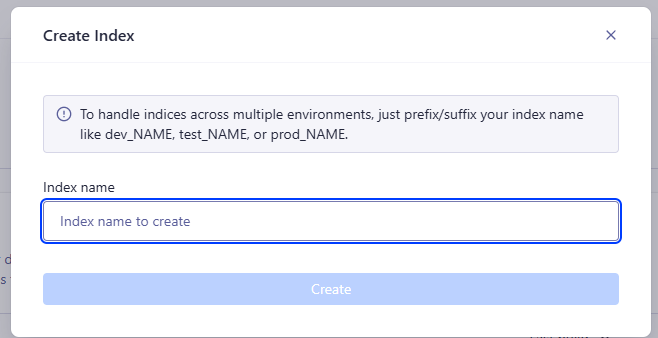
进入页面后,点击 `Create Index` 创建 Index

接下来填写 Index 的名称即可
##### 配置 Index(重要)
> 不要忽略这一步,不然会导致搜索不到内容
找到 Index 页面中的 `Configuration` 选项

下面需要修改3处地方
**Searchable attributes** 的值新增:
```
title
content
keywords
description
lang
language
hierarchy.lvl0
hierarchy.lvl1
hierarchy.lvl2
hierarchy.lvl3
hierarchy.lvl4
hierarchy.lvl5
hierarchy.lvl6
```

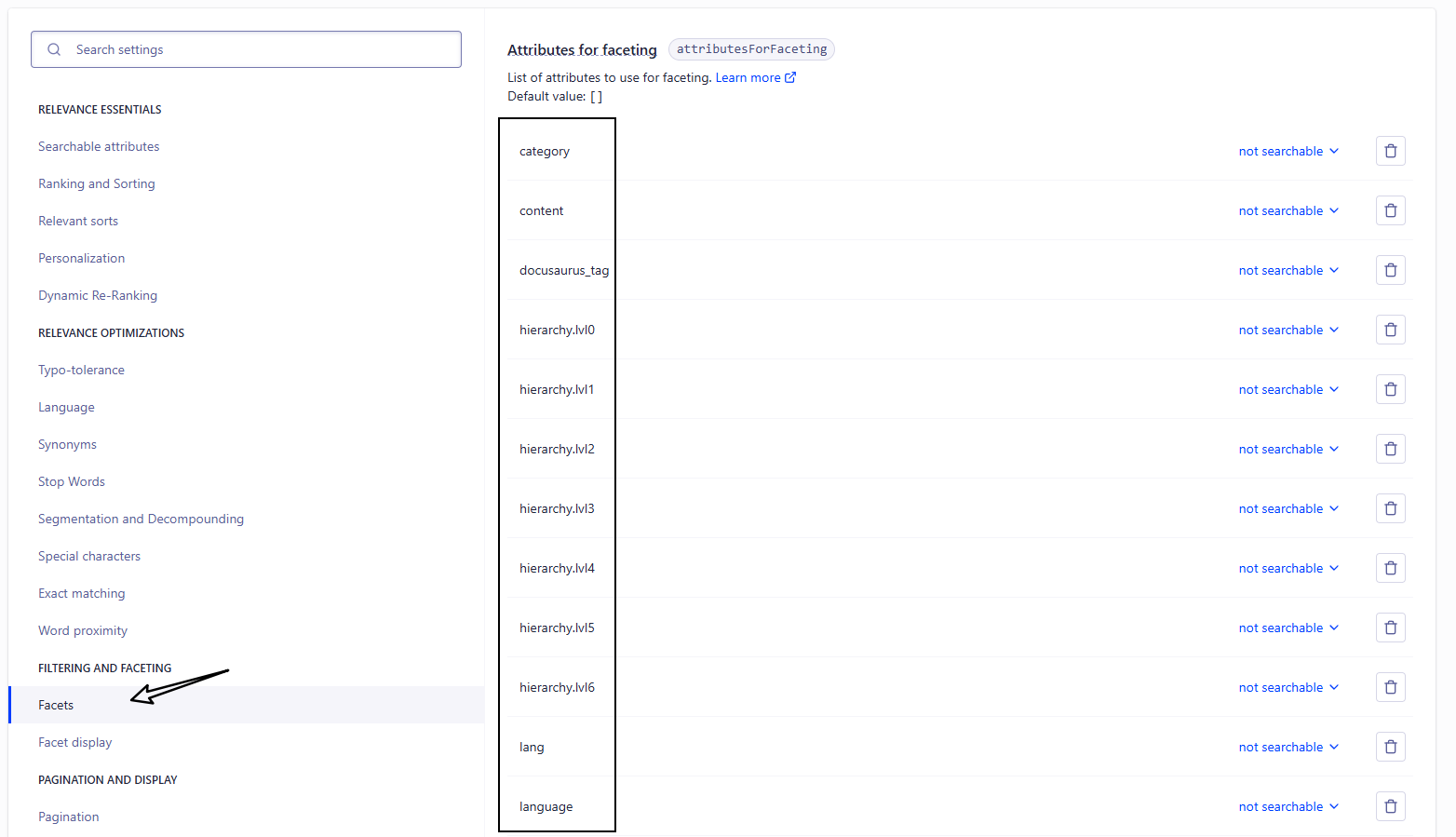
**Facts** 的值新增:
```
category
content
docusaurus_tag
lang
language
hierarchy.lvl0
hierarchy.lvl1
hierarchy.lvl2
hierarchy.lvl3
hierarchy.lvl4
hierarchy.lvl5
hierarchy.lvl6
```
**Languages** 的值新增:
Index Languages 和 Query Languages 都需要添加
```
Chinese
English
```

#### 2. 修改 docusaurus.config.js
```json
{
"config": {
"themeConfig": {
"algolia": {
"appId": "填写申请的appId",
"apiKey": "填写申请的apiKey",
"indexName": "填写申请的indexName"
}
}
}
}
```
需要填写的信息可以在[该页面](https://dashboard.algolia.com/account/overview)中进行查找

进入该页面后即可查询到 `appId` 和 `apiKey`
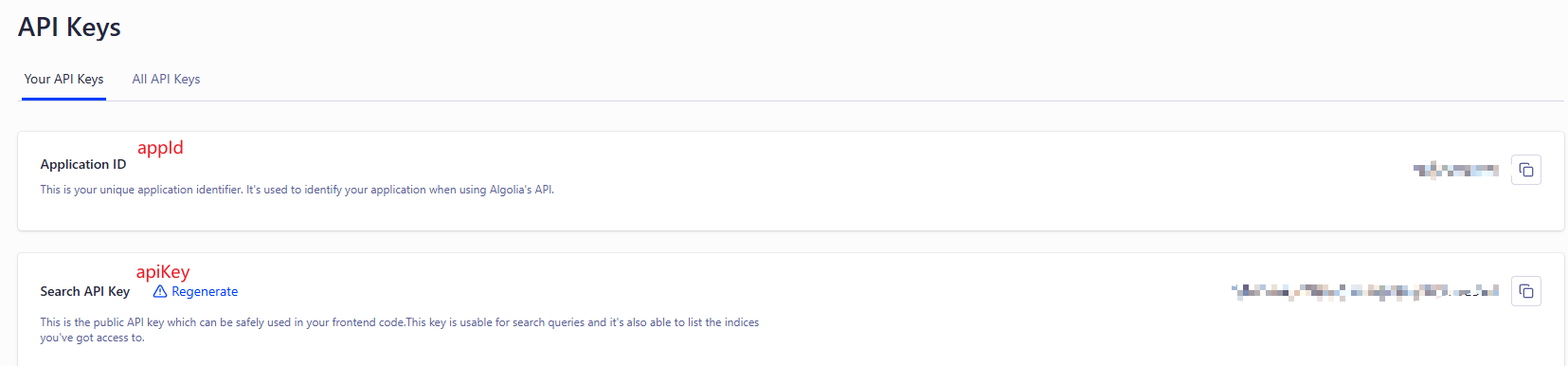
- `appId`:就是申请的 Application ID
- `apiKey`:就是 Search API Key
- `IndexName`:就是申请的 Index 的名称
这样就会自动在 `navbar` 添加个搜索框
#### 3. 爬虫
爬虫就是将自己网站的信息爬到 algolia 网站上,在这分为两种:
- algolia爬虫:使用 algolia 网站上的爬虫进行爬取(这个好像也需要申请)
- 自定义爬虫:配置一个自定义爬虫,使用 Docker 或 GitHub Actions 来自动化执行爬虫任务
##### algolia爬虫
还是进入 Index 页面,点击 `event data`

点击 `Crawler` 里面的 `Add your domain`

然后输入自己的网址进行验证,可选择多种方式
> 如果选择 DNS 的话,需要在域名服务商的 DNS 解析处进行配置
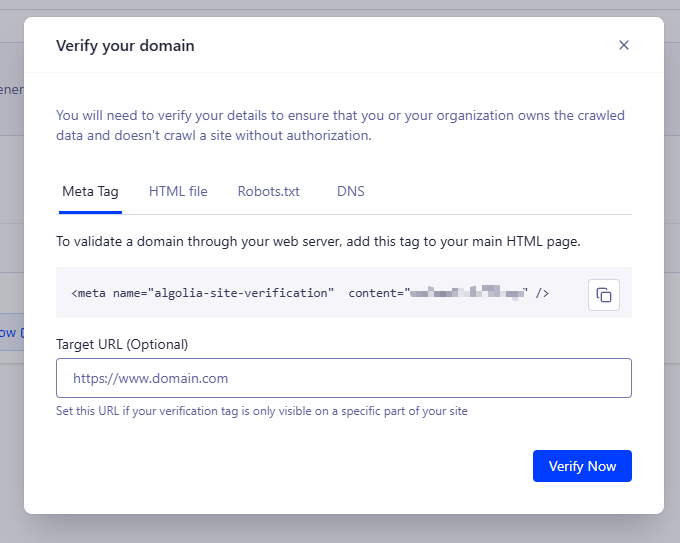
验证成功后,新建爬虫信息

填写相关信息
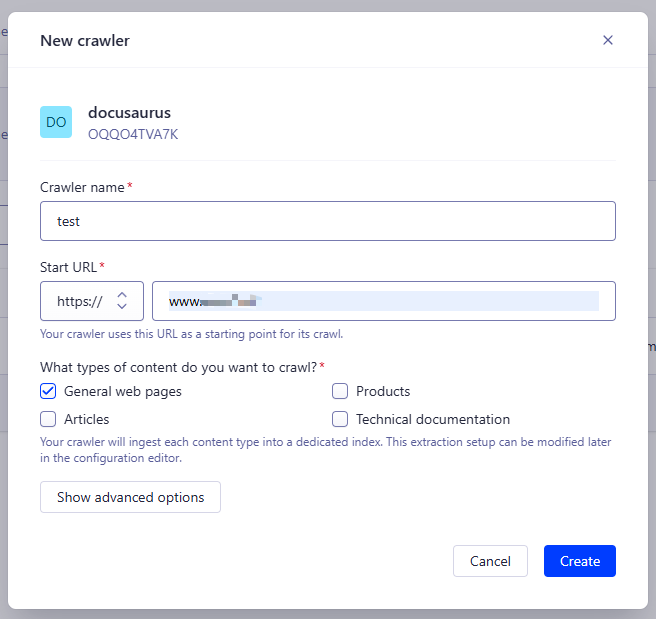
创建成功后,点击 Index 名称进入爬虫页面

默认创建好就进行爬虫了,但是配置信息需要改下,配置参考 [官方推荐](https://docsearch.algolia.com/docs/templates/#docusaurus-v3-template)
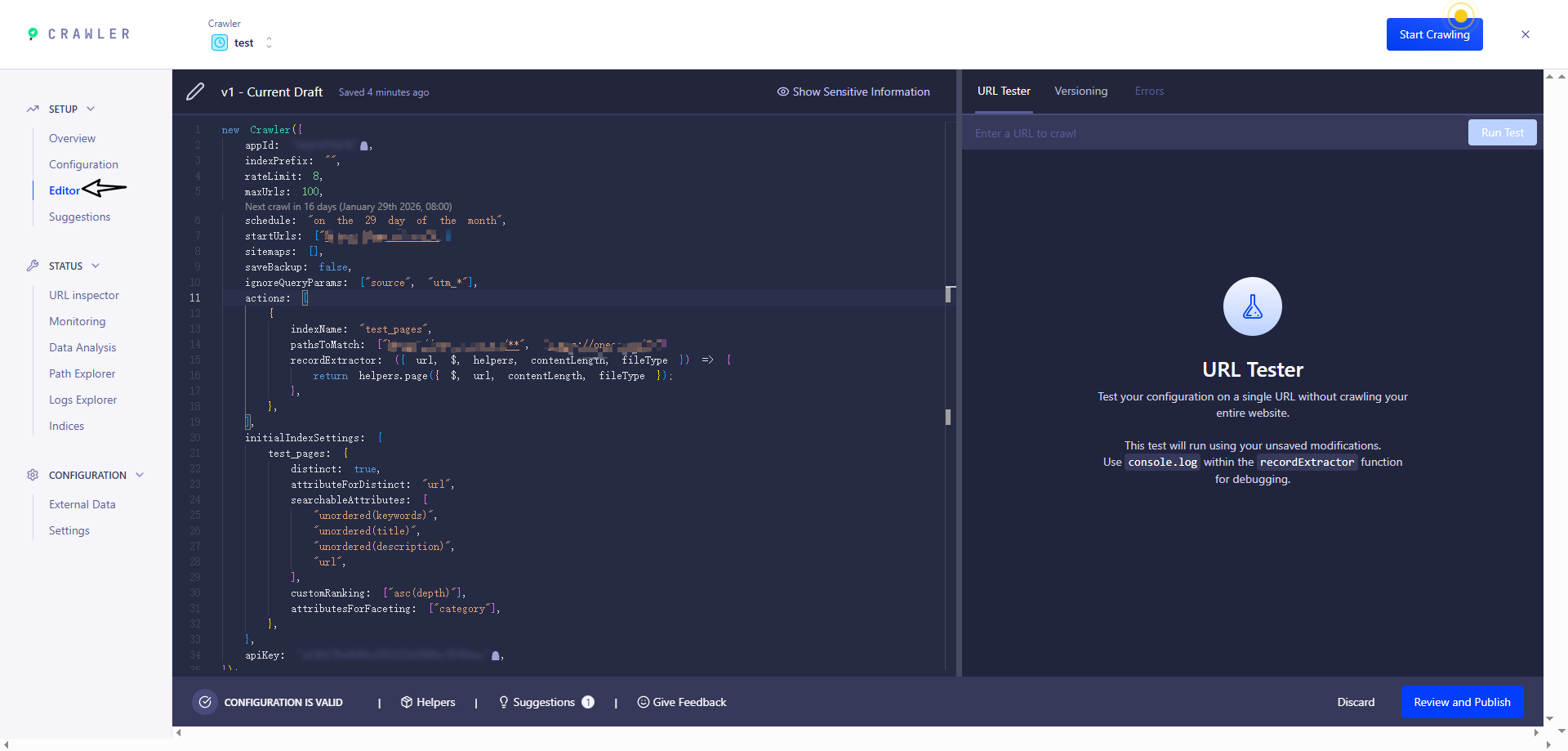
> 注意:这里用到的key是 Write API Key
```js title="Editor"
new Crawler({
appId: 'YOUR_APP_ID',
apiKey: 'YOUR_API_KEY',
rateLimit: 8,
maxDepth: 10,
// 每天0点爬取一次
schedule: 'every 1 day at 12:00 am',
startUrls: ['https://YOUR_WEBSITE_URL/'],
sitemaps: ['https://YOUR_WEBSITE_URL/sitemap.xml'],
ignoreCanonicalTo: true,
discoveryPatterns: ['https://YOUR_WEBSITE_URL/**'],
actions: [
{
indexName: 'YOUR_INDEX_NAME',
pathsToMatch: ['https://YOUR_WEBSITE_URL/**'],
recordExtractor: ({ $, helpers }) => {
// priority order: deepest active sub list header -> navbar active item -> 'Documentation'
const lvl0
= $(
'.menu__link.menu__link--sublist.menu__link--active, .navbar__item.navbar__link--active'
)
.last()
.text() || 'Documentation'
return helpers.docsearch({
recordProps: {
lvl0: {
selectors: '',
defaultValue: lvl0,
},
lvl1: ['header h1', 'article h1'],
lvl2: 'article h2',
lvl3: 'article h3',
lvl4: 'article h4',
lvl5: 'article h5, article td:first-child',
lvl6: 'article h6',
content: 'article p, article li, article td:last-child',
},
indexHeadings: true,
aggregateContent: true,
recordVersion: 'v3',
})
},
},
],
initialIndexSettings: {
YOUR_INDEX_NAME: {
attributesForFaceting: [
'type',
'lang',
'language',
'version',
'docusaurus_tag',
],
attributesToRetrieve: [
'hierarchy',
'content',
'anchor',
'url',
'url_without_anchor',
'type',
],
attributesToHighlight: ['hierarchy', 'content'],
attributesToSnippet: ['content:10'],
camelCaseAttributes: ['hierarchy', 'content'],
searchableAttributes: [
'unordered(hierarchy.lvl0)',
'unordered(hierarchy.lvl1)',
'unordered(hierarchy.lvl2)',
'unordered(hierarchy.lvl3)',
'unordered(hierarchy.lvl4)',
'unordered(hierarchy.lvl5)',
'unordered(hierarchy.lvl6)',
'content',
],
distinct: true,
attributeForDistinct: 'url',
customRanking: [
'desc(weight.pageRank)',
'desc(weight.level)',
'asc(weight.position)',
],
ranking: [
'words',
'filters',
'typo',
'attribute',
'proximity',
'exact',
'custom',
],
highlightPreTag: '',
highlightPostTag: '',
minWordSizefor1Typo: 3,
minWordSizefor2Typos: 7,
allowTyposOnNumericTokens: false,
minProximity: 1,
ignorePlurals: true,
advancedSyntax: true,
attributeCriteriaComputedByMinProximity: true,
removeWordsIfNoResults: 'allOptional',
separatorsToIndex: '_',
},
},
})
```
> 注意:`schedule` 现在是每天0点自动爬取,表达式参考 https://www.algolia.com/doc/tools/crawler/apis/configuration/schedule?utm_medium=page_link&utm_source=dashboard
修改成功后重新爬虫
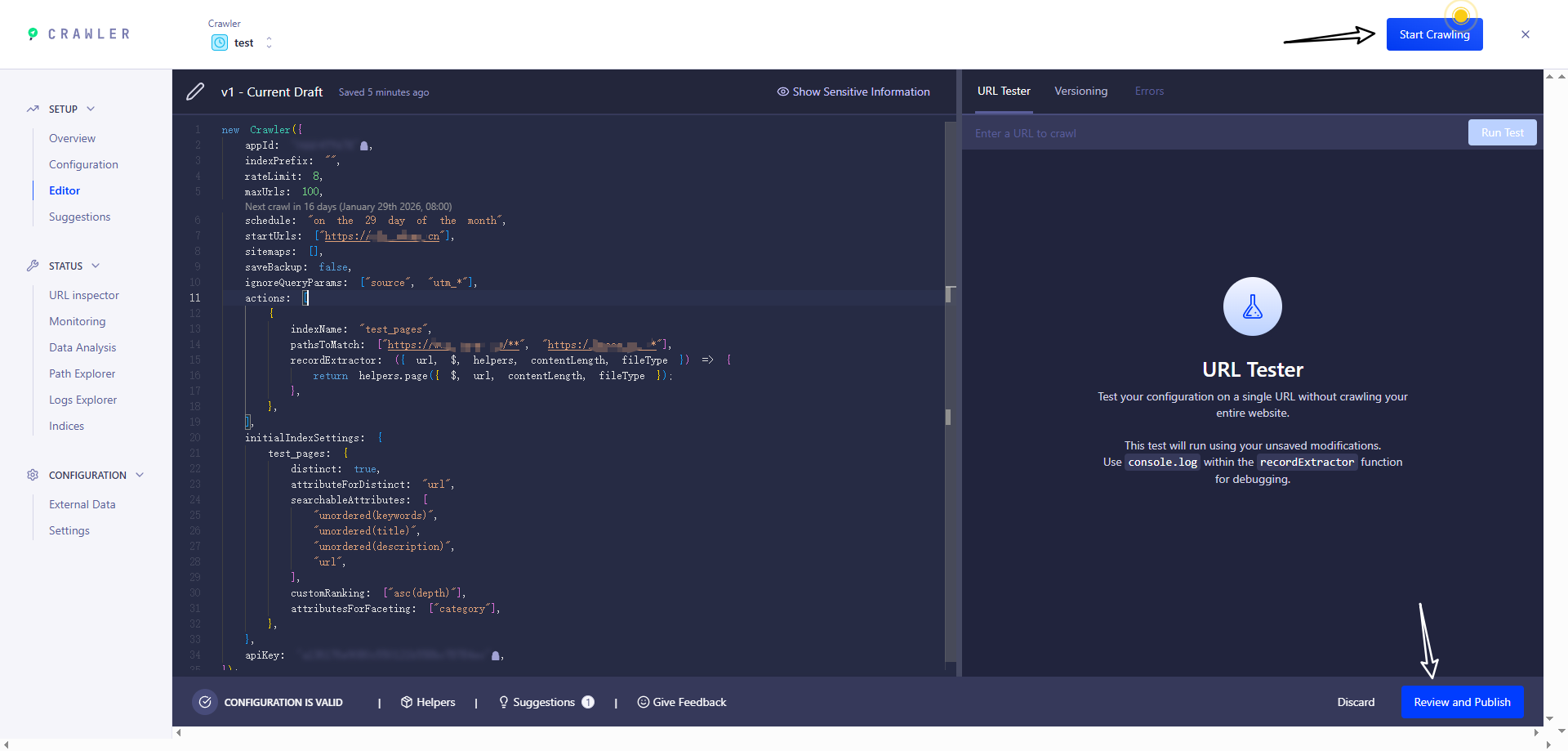
进入该页面即可查看爬虫后的全部信息

当爬虫结束并成功后,返回 Index 页面,如果出现下面页面的内容即 **代表成功**

成功后,进入网站进行搜索即可
##### 自定义爬虫(Docker)
服务器上安装 `jq` 解析 `json` 文件
```bash
sudo apt update && sudo apt install -y jq
```
在项目根目录下新增 `.env` 和 `.docsearch.json` 文件
```bash title='.env'
ALGOLIA_APP_ID=xxx
ALGOLIA_API_KEY=xxx
```
```json title='.docsearch.json'
{
// 需要替换
"index_name": "xxx",
// 需要替换。网站网址
"start_urls": ["xxx"],
// 需要替换。sitemap的网址,docusaurus 默认在根目录下生成 sitemap.xml
"sitemap_urls": ["xxx"],
"selectors": {
"lvl0": {
"selector": "(//ul[contains(@class,'menu__list')]//a[contains(@class, 'menu__link menu__link--sublist menu__link--active')]/text() | //nav[contains(@class, 'navbar')]//a[contains(@class, 'navbar__link--active')]/text())[last()]",
"type": "xpath",
"global": true,
"default_value": "Documentation"
},
"lvl1": "header h1, article h1",
"lvl2": "article h2",
"lvl3": "article h3",
"lvl4": "article h4",
"lvl5": "article h5, article td:first-child",
"lvl6": "article h6",
"text": "article p, article li, article td:last-child"
},
"custom_settings": {
"attributesForFaceting": [
"type",
"lang",
"language",
"version",
"docusaurus_tag"
],
"attributesToRetrieve": [
"hierarchy",
"content",
"anchor",
"url",
"url_without_anchor",
"type"
],
"attributesToHighlight": ["hierarchy", "content"],
"attributesToSnippet": ["content:10"],
"camelCaseAttributes": ["hierarchy", "content"],
"searchableAttributes": [
"unordered(hierarchy.lvl0)",
"unordered(hierarchy.lvl1)",
"unordered(hierarchy.lvl2)",
"unordered(hierarchy.lvl3)",
"unordered(hierarchy.lvl4)",
"unordered(hierarchy.lvl5)",
"unordered(hierarchy.lvl6)",
"content"
],
"distinct": true,
"attributeForDistinct": "url",
"customRanking": [
"desc(weight.pageRank)",
"desc(weight.level)",
"asc(weight.position)"
],
"ranking": [
"words",
"filters",
"typo",
"attribute",
"proximity",
"exact",
"custom"
],
"highlightPreTag": "",
"highlightPostTag": "",
"minWordSizefor1Typo": 3,
"minWordSizefor2Typos": 7,
"allowTyposOnNumericTokens": false,
"minProximity": 1,
"ignorePlurals": true,
"advancedSyntax": true,
"attributeCriteriaComputedByMinProximity": true,
"removeWordsIfNoResults": "allOptional",
"separatorsToIndex": "_",
"synonyms": [
["js", "javascript"],
["ts", "typescript"]
]
}
}
```
然后运行命令
```bash
docker run -it --env-file=.env -e "CONFIG=$(cat docsearch.json | jq -r tostring)" algolia/docsearch-scraper
```
> 报错:algoliasearch.exceptions.RequestException: Method not allowed with this API key
> 这个问题就是权限不够,需要使用 `Admin API Key`
如果出现下面页面的内容即 **代表成功**

### Giscus(评论)
https://giscus.app/zh-CN
#### 1. 准备一个 github 仓库
> 新建 或 已存在 的库都可以
修改配置:`/Settings/General`
保证仓库的 Danger Zone - visibility 是 public的

开启 Features - Discussions 功能

#### 2. 配置 [giscus](https://github.com/apps/giscus)
在 github 中开启 giscus 功能,可根据需求选择指定的仓库或公共仓库
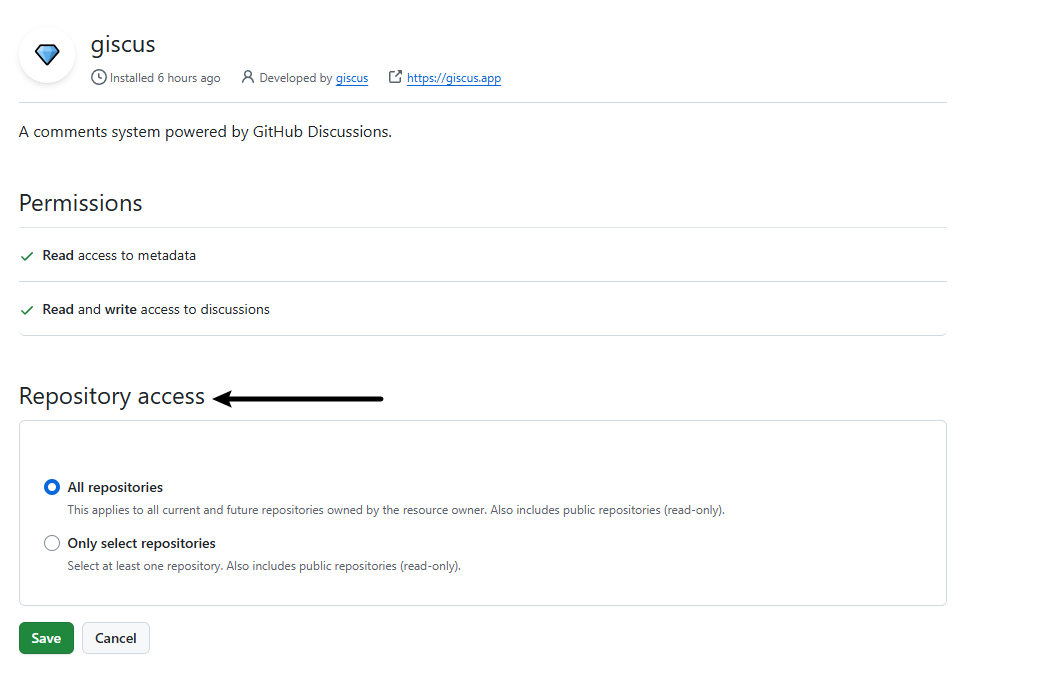
开启完毕后进入 [giscus](https://github.com/apps/giscus) 的官网,然后按照顺序配置:
1. 选择语言
2. **仓库**:输入刚刚准备好的 github 仓库地址
3. **页面 ↔️ discussion 映射关系** 选择 **Discussion 的标题包含页面的 pathname**
4. **Discussion 分类** 选择第一个 **Announcements**
5. 其他保持默认即可
然后下滑找到 **启用 giscus** 模块,里面的 `